General
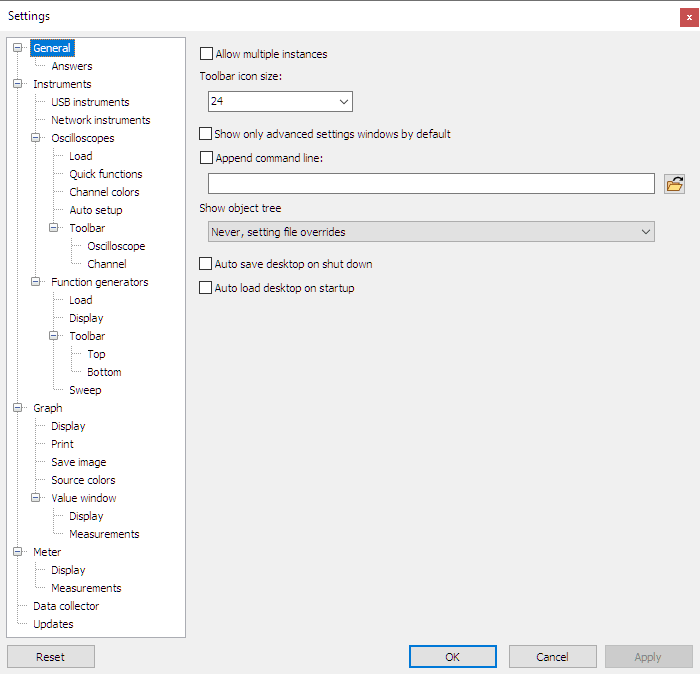
Allow multiple instances
When Allow multiple instances is turned on, each launch of the Multi Channel oscilloscope software will open a new instance. Any command line parameter is used in that instance. When Allow multiple instances is turned off (default), the first launch will start the Multi Channel oscilloscope software. While this instance of the Multi Channel oscilloscope software is running, any next launch will result in the command line parameters being passed to it and executed there. Several command line options work best when Allow multiple instances is turned off.
Toolbar icon size
The size of the icons on the main toolbar and the quick functions toolbar can be changed to predefined as well as user defined values.
Show only advanced settings windows by default
The settings windows for instruments, channels and I/Os can be shown in a standard version, with only the most used setings and in an advanced version, with all settings.
When Show only advanced settings windows by default is ticked, the settings window always shows all settings. There is no checkbox for enabling / disabling advanced settings.
When Show only advanced settings windows by default is not set, each dialog gets an Advanced checkbox.
When Advanced is ticked, the extended window with all settings is shown.
When Advanced is not ticked, the standard window with only the most used settings is shown.
Append command line
When Append command line is turned on, the commands entered in the edit field will be executed when the Multi Channel oscilloscope software is started. All command line parameters can be used here.
This feature can be used for example to load your preferred default setting at start-up,
or to set the window size or position to a default value.
The  File
open button can be used to select a TPS setting file to be loaded when the Multi Channel oscilloscope software is started.
File
open button can be used to select a TPS setting file to be loaded when the Multi Channel oscilloscope software is started.
Show object tree
The selection Show object tree gives four options to control the the visibility of the object screen in the main window:
- Always: the object screenis always visible.
- Always, setting file overrides: the object screenis always visible, but when a setting file is loaded in which the object screenis hidden, it will become hidden. Never, setting file overrides: the object screenis never visible, but when a setting file is loaded in which the object screenis visible, it will become visible.
- Never: the object screenis never visible.
Auto save desktop on shut down
When Auto save desktop on shut down is enabled, the current setup of the Multi Channel oscilloscope software is saved to disk when the software is closed.
Auto load desktop on startup
When Auto load desktop on startup is enabled, a previously auto saved setup of the Multi Channel oscilloscope software is loaded from disk when the software is started.