Comparator

The comparator works as follows: all values of the signal are compared to the Reference value. Depending on the selected Comparison the comparator indicates whether each sample is higher than or equal to the selected reference value or lower than the reference value. How the comparator indicates this depends on the selected Mode.
Properties and actions
To control the behavior of the Comparator I/O, several properties are available.
These can be accessed through a popup menu which is shown when the I/O is right clicked in the Object screen.
The properties can also be accessed through its settings window which is shown when the I/O is double clicked in the Object screen.
To open the Object screen, click the  Show object screen button.
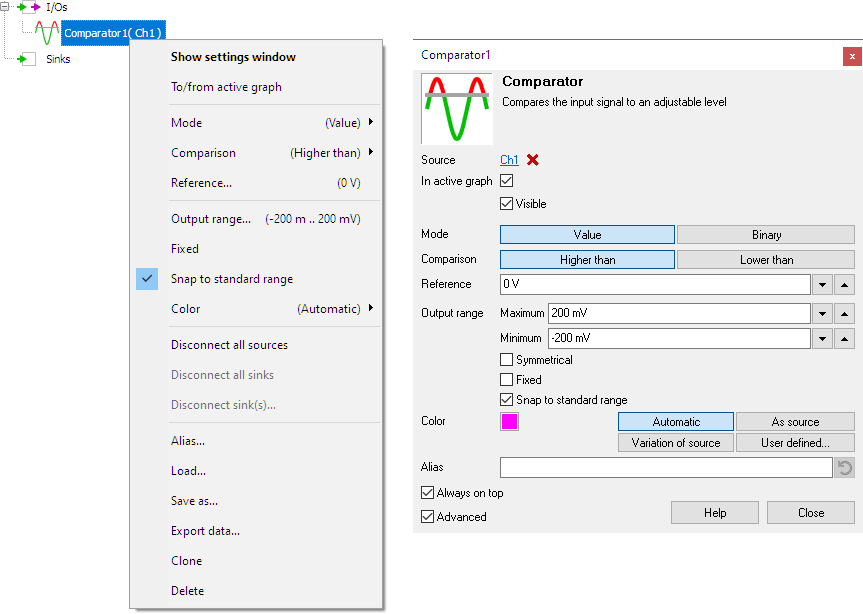
By default, the settings window only shows the most used settings. When Advanced is ticked, the extended window with all settings is shown. See also the program settings.
Mode
The Mode property determines how the Comparator I/O indicates whether the comparison between input signal and reference value is true or false.
-
Mode is Value
- When the comparison is true, the comparator outputs the input value.
- When the comparison is false, the comparator outputs the reference value.
-
Mode is Binary
- When the comparison is true, the comparator outputs the value "1".
- When the comparison is false, the comparator outputs the value "0".
Comparison
The Comparison property determines how the input signal is compared to the reference value.
-
Comparison is Higher than
- When the input signal is higher than or equal to the reference level, the comparison is true
- When the input signal is lower than the reference level, the comparison is false.
-
Comparison is Lower than
- When the input signal is lower than the reference level, the comparison is true
- When the input signal is higher than or equal to the reference level, the comparison is false.
Reference
The Reference property sets the reference value of the Comparator I/O to which it compares the input signal.


